
You hear a great song in a YouTube video, and then the video ends.
No title, no credit, just that tune stuck in your head.
You try the comments. Nothing. You rewind. Still nothing.
That small moment wastes more time than it should.
This guide shows simple ways to find the name of a song used in a YouTube video, even when the creator did not mention it.
By the end, you will know exactly what to try next time this happens.
In Summary
- Look at the video description first since creators usually drop the song names there, and YouTube sometimes shows you the track right away 1.
- Searching comments or lyrics only works when the song is popular or has clear English lyrics, which means it often fails for instrumental tracks 2.
- Shazam is the easiest way out since it can pick up the song just by listening while your video plays, but with Audiotag, you have to copy the link and mess with picking the right spot in the video for it to work 3.
How to Identify a Song in a YouTube Video
Let’s face it. Finding a specific song in a YouTube video used to be tough. You had to do it on your own and listen closely.
It was a real pain.
But things are different now.
Here are 5 ways you can try right now to find that song stuck in your head.
#1. Check the Video Description on YouTube
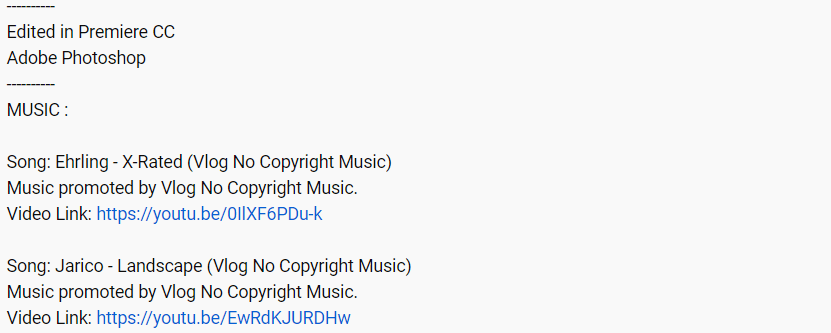
You might have noticed that many of them always list the songs and music they use in their video descriptions.
If you check the video description below, you can easily find them.
They often use non-copyrighted music, so it’s likely listed as a music credit.
YouTube has also started mentioning the songs used in those videos and even Shorts now. So no need to stress about it anymore!
#2. Check the Comments
So what if the creator forgets to mention the song in their description? No worries!
The comments section is super helpful for finding out more about the video. Just take your time to read through all the comments, and you might just get lucky and find the song you’re looking for.
Check out if anyone else has already asked about that particular song in the comments.
You can also leave a comment asking about the song and mentioning a specific time frame (like “Hey, what’s that song from 1:30 to 2:30?”).
If the creator doesn’t respond, sometimes other fans will jump in and help you out.
#3. Search for the lyrics
If you’ve got some song lyrics stuck in your head, just pop them into Google or YouTube. It could be a whole line or just a single word that’s been on repeat in your mind.
If it’s an English song, chances are high you’ll find what you’re looking for on Google.

You can also check out lyric websites like AZLyrics.com, Lyrics.com, and Lyricsworld.com for even more options.
#4. Use the YouTube Video Link
If you’re still struggling to find a song in a YouTube video, there are services like Audiotag.info that can help you find a song with a YouTube link. Just copy the YouTube video URL and paste it into the Audio tag.
Then, pick the time when the song starts playing.
#5. Use an App to Identify a Song in a YouTube Video
If none of those ways work, there’s one option left. You can use a mobile app to find the song you want.
There’s a great app called “Shazam” that helps you identify music. You can get it on your Android or iPhone.
Once it’s installed, play the YouTube video in the background, and Shazam will listen and identify the song in just a few seconds!
What’s even cooler is that Shazam lets you connect with Spotify or Apple Music, so whenever you look up a new song using Shazam, there’s an option to add it directly to your Spotify or Apple Music library!
What is the Easiest Way to Identify Songs in YouTube Videos?
If you’re wondering how to find out the names of songs in YouTube videos, Shazam is your best bet. It works well for me, both as a mobile app and on the web.
You can also check the video descriptions, search for lyrics, and read the comments while watching videos to identify songs.
Do whatever works best for you.
So what’s your favorite way to identify the songs in YouTube videos? Tell your friends about it!
