If you’re thinking about starting an online business, creating and selling information products is one of the simplest ways to make money online.
And no, I’m not just saying that because of all those viral videos you keep seeing everywhere.
Ebooks, for example, are one of the most popular types of information products, and it is predicted that the number of readers in the eBook market will reach 1.1bn users by 2027.
The power of these digital products is that once created, they can generate passive income while helping others learn and grow.
So if you’ve been wanting to start but aren’t sure where to begin, here are seven information product ideas that even beginners can create and sell in 2026.

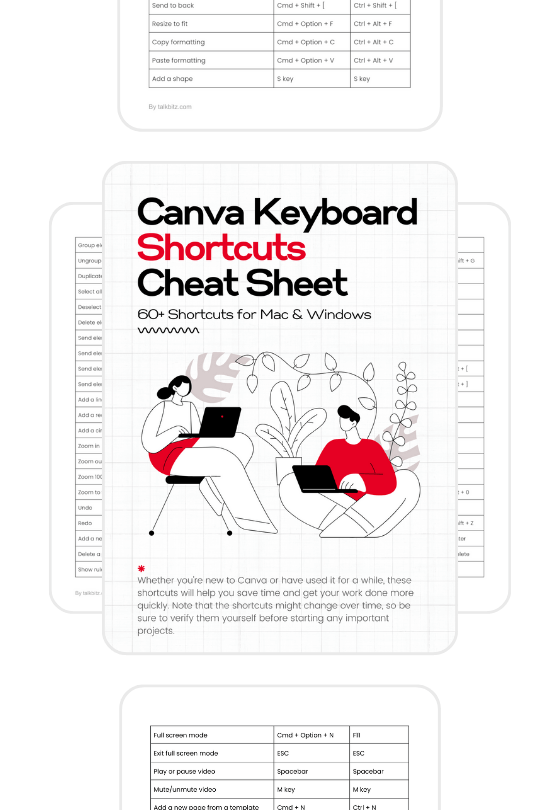
1. Cheat Sheets and Checklists
Everyone loves a good shortcut, and that’s exactly what cheat sheets and checklists do.
Think about creating a “Packing for Vacation Checklist” or a “Website Launch Checklist.”
I bet you may have already heard about them.
The key is to include everything someone needs to complete a task successfully but format it in a way that’s easy to scan and use.
If you just enter “checklist” into Etsy’s search bar, you’ll see thousands of these types of products listed.

So yes, Etsy is a great place to get ideas and also a place to sell your own products.
Another important thing is, these products are also perfect for batch creation.
What I mean is, you could create several related checklists and sell them as a bundle. Price them low individually ($2–10) but offer better value in bundles ($10–20).
2. Quick Start Guides
If you’re not a fan of cheat sheets and checklists, quick start guides are a good example when it comes to information product ideas.
Well, but how?
They’re easy to make and help people learn new things step by step, as long as you present exactly what people need to know.
And making a quick start guide is not that hard.
All you need to do is find something people struggle with in your field.
Let’s say, for example, you know about building WordPress websites.
In this case, you could make a “Beginner’s Guide to Making Your First WordPress Website.” You can write down the main steps, add helpful screenshots, or any other information worth sharing.
The best part? You can make these guides with basic tools like Google Docs or Canva, save them as PDFs, and sell them using free platforms like Payhip, Gumroad, or even Teachable.
Price them between $5 and $15, and you can always adjust based on feedback.
3. Mini-Courses
Mini-courses are focused, specific, and much easier to create than full-length courses. They solve one particular problem or teach one specific skill, making them perfect for both creator and student.
For example, an “Instagram Story Basics” mini-course could be just 4–5 short video lessons, each 5–10 minutes long.
I don’t think you need fancy equipment.
A good microphone, screen recording software, and clear explanations are enough to start.

Platforms like Teachable or Podia make hosting and selling your mini-course simple, and VEED.IO is a great tool for making videos without even downloading any software.
Price points can range from $20 to $50, depending on the value and depth of your course content.
And for a more premium feel, you could also offer early-bird discounts or bundle it with other resources like ebooks, checklists, or templates.
4. Email Courses
Email courses are brilliant because they combine educating your audience with marketing.
The coolest part is they’re delivered automatically through email marketing platforms, making them extremely low-maintenance once set up.
Let’s say, your email course might be “5 Days of Decluttering Your Digital Space” or “14 Days to Better Time Management.”
The important part here is breaking down the topic you have knowledge or experience in into digestible daily lessons that build upon each other.
You can offer these courses for free as lead magnets and then upsell a premium version with additional resources, or charge a small fee for joining the email list itself.
One great email marketing tool I recommend for this is Kit.com.
It’s also creator-focused, so you get more from their platform, and you can even start a paid newsletter or sell digital products from there.

What works well here is that you educate them first, build a relationship and trust, and make it easier to pitch your products or services.
However, if you’re new to email marketing, things might not be easy to figure out yourself.
Well, don’t worry.
Kit has a platform called Creator University where you can learn before diving in, so make sure to take advantage of it.
5. Toolkits
Toolkits are collections of resources that work together to solve a specific problem. Think about a “Freelancer’s Starter Toolkit” that includes contract templates, invoice templates, and client questionnaires.
You can start by creating each part of your toolkit separately.
This way, you can test each part and make it better as you go.
You can also sell the parts one by one, or put them all together in a package deal for a discounted price to encourage people to purchase from you.
However, do some research before settling on an idea, as not all audiences will see value in a toolkit.
This means focusing on niches with clear pain points and an active demand for practical, ready-made solutions.
6. Templates
Templates are another great addition to any information product because they save time and provide a structured way for users to achieve specific goals.
For example, a “Content Calendar Template” helps marketers plan their posts effectively, while a “Budget Tracker Template” can help people manage their finances.
You get the idea.
These pre-designed frameworks reduce the hassle of starting from scratch, allowing users to focus on personalizing the content.
Templates created in tools like Canva, Google Docs, or even Notion can be both visually appealing and functional, with features like checkboxes, fillable sections, and guided prompts.
The best part is that if you have created templates for Notion users, you can even list them for sale directly on Notion’s Marketplace.

This setup allows you to reach a large audience of Notion users and manage your sales super easily.
You can set a pricing range from $5 to $20, depending on how much value they provide to the audience.
7. Webinar Recordings
Webinar recordings are fantastic because you can create them once and sell them repeatedly.
Host a live webinar, record it, and then package it as a product. The live element adds authenticity and energy that’s hard to replicate in scripted content.
So, how do you start?
First of all, to host a successful webinar, you need to have an engaged audience.
Building an email list, promoting your webinar on social media, and collaborating with influencers or partners in your niche can help you attract attendees.
What I believe is, even a small audience can be impactful if they’re genuinely interested in the topic.
You can start by focusing on solving a specific problem in 60–90 minutes. Include your slides, a Q&A session, and maybe some bonus resources.
One great platform I can recommend for this is Podia.

It lets you sell access to your webinars on Zoom or even YouTube Live, and when it’s all over, you can even sell the replays, meaning the recordings.
Price points can vary depending on how much value they provide to the audience and the additional materials you provide.
Getting Started: Your Next Steps
Now that we’ve explored various information product ideas, you might be wondering which one to focus on first.
Well, there’s no single “right” choice. But the best product for you depends on your skills, interests, and target audience.
Here’s how to start:
- Pick something you’re good at and that people want
- Start with something small and basic
- Work on it a little bit each week
- Use tools you know how to use
- Try it out with a few people first before selling it to everyone
The most important thing to remember is that each of these product types has its own advantages, and no one can guarantee you will make money right away, but at least you can start for free.
Another thing is, the digital product market continues to grow, and there’s always room for well-crafted, helpful resources.
Choose your product type, start creating, and remember that done is better than perfect!