
Bluehost works. For getting a blog started, it genuinely does.
But if you think this is a permanent solution, well, that part needs a second look.
Sure, the setup really is as easy as they say. WordPress installs in a few clicks, your domain is free for year one, and you can be live in under an hour.
That’s all true.
But shared hosting has a ceiling, and the low price at the start is not the full story. Both of those get people when they are not looking, usually at the same time.
I have run this blog on over 5 different hosts over the years. Bluehost was one, before I moved everything to Cloudways.
So here’s what I’d tell someone who’s about to sign up.
What's Inside
What is Bluehost?
Bluehost is a web hosting service started in 2003 by Matt Heaton and Danny Ashworth. In 2010, Endurance International Group acquired it, and that company eventually rebranded to Newfold Digital.
→ Click here to head over to Bluehost and find the right web hosting plan for you
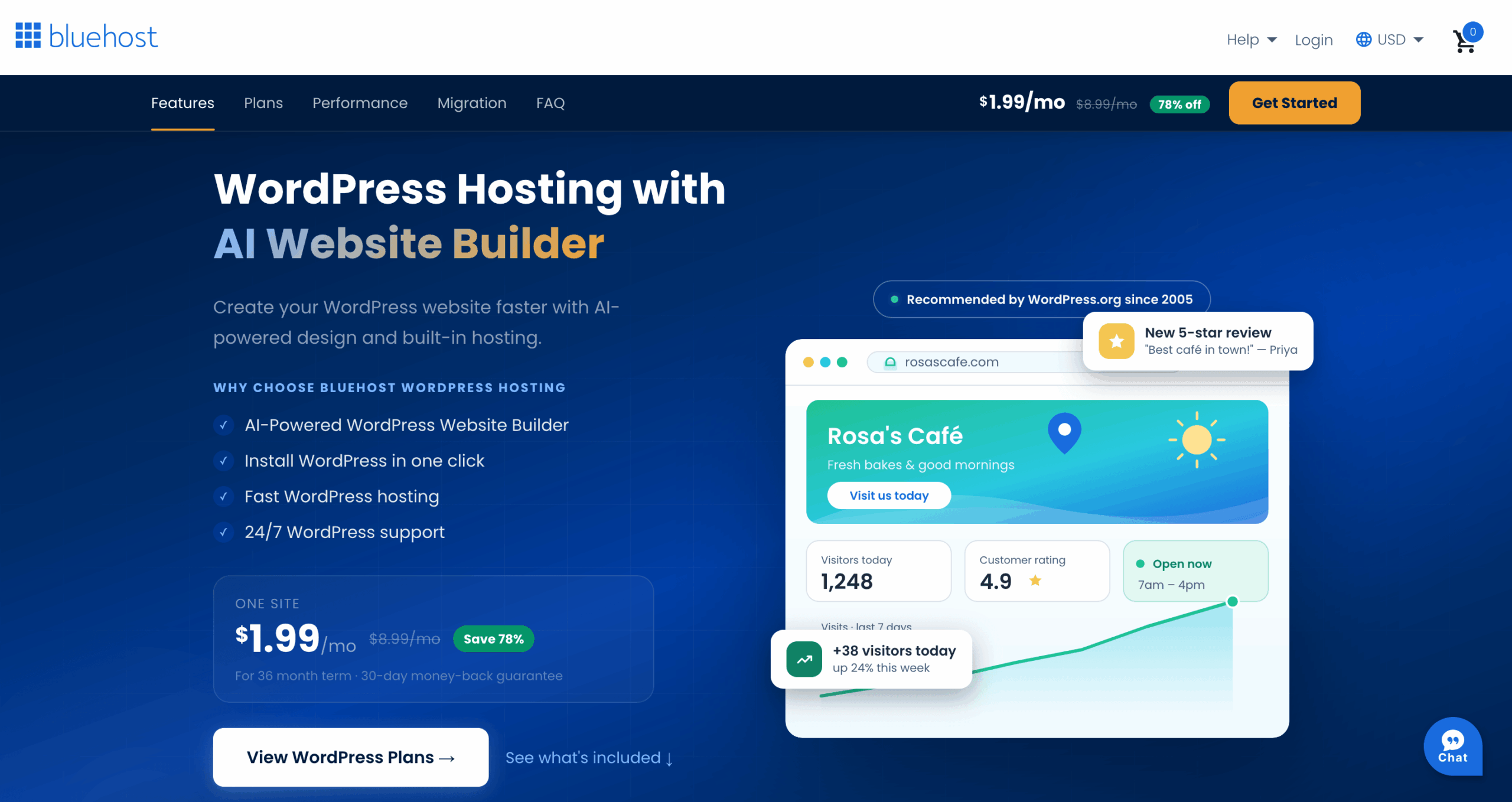
Today Bluehost serves over 5 million users worldwide, making it one of the larger hosting providers. It’s also one of the hosting companies officially recommended by WordPress.org, a recommendation it has held since 2005.
Features and Services Offered by Bluehost
Bluehost gives you a wide range of features. Here’s what actually comes with it:
- One-click WordPress installation: No database setup, no FTP client, no terminal commands. You click install, and WordPress is running. For someone with no technical background, this alone saves a lot of time and confusion at the start.
- Free domain name: When you sign up for a hosting plan, you get a free domain for the first year with free SSL included. One less thing to buy separately.
- AI site builder: Includes an AI-powered site builder that helps you get a basic WordPress site structure up without touching any code.
- Weekly backups: Runs automatic weekly backups on all shared hosting plans.
- Security features: SSL certificates, site backup, and automatic WordPress updates are included, though some of those depend on which plan tier you’re on.
- 24/7 Customer Support: Available by phone, live chat, or email. There’s also a knowledge base if you’d rather troubleshoot yourself before calling anyone.
Another thing is Bluehost offers a 30-day money-back guarantee on eligible hosting plans. If you claimed the free domain and later request a refund, Bluehost deducts the domain registration fee from your refund because you keep ownership of the domain.
Pricing Plans and Options
This is the part most people skim, which is exactly how they end up surprised when the renewal email lands.
Bluehost’s intro pricing is one of the lowest you’ll find for legitimate WordPress hosting. But the number on the homepage is the promotional rate for your first term only.
When that term ends, the renewal rate is noticeably higher. Not a little higher, I mean a lot higher.
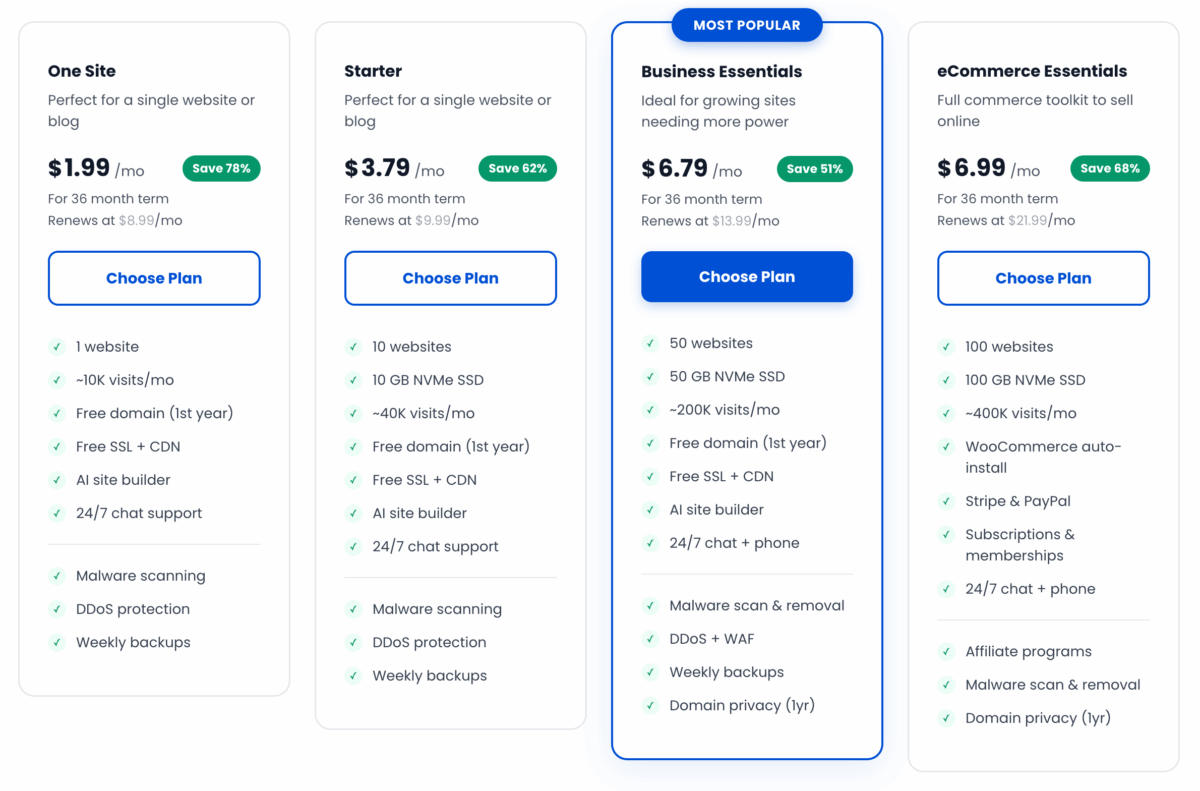
Here are the current plans:
| Hosting Type | Best For | Not For | Cheapest Plan |
|---|---|---|---|
| Shared Hosting | Beginners, personal blogs, and small businesses with low website traffic | High-traffic websites, resource-intensive websites, and those that need more control | $1.99/month |
| WordPress Hosting | Small to medium-sized businesses that use WordPress as their CMS | Large enterprises with high-traffic websites | $3.79/month |
| WordPress Cloud Hosting | Enterprise-level businesses, high-traffic WordPress websites | Small businesses with low website traffic | $65.00/month |
| WooCommerce Hosting | eCommerce websites that use WooCommerce | Non-WooCommerce websites | $6.99/month |
| VPS Hosting | High-traffic websites, resource-intensive websites, and those that need more control | Beginners and those who don’t need advanced features | $2.09/month |
| Dedicated Hosting | Large enterprises with high-traffic websites and resource-intensive websites | Small businesses and those who don’t need advanced features | $144.19/month |
So which Bluehost plan is best for bloggers?
For most people starting and a first-time blogger, the One Site Shared Hosting plan is where to start. You get 10GB of storage, a free domain for year one, 10K monthly visits (approx. 330 visits per day), and one-click WordPress.
That’s everything you need to go live.
You don’t need to go higher until you’re getting thousands of monthly visitors and actually noticing the difference.
But note that the pricing of $1.99/month is for a 36-month term, which is 3 years, and you have to pay around $71 plus whatever add-ons you take and taxes if they apply to you.
And if you plan to stay with Bluehost after that term, you also need to think about the renewal price.
For example, if we take the lowest plan, the $1.99/month (One Site) intro rate shifts to $8.99/month on renewal. That’s about 4.5 times (about 352%) the intro rate.
By the time that happens, hopefully the blog is already doing something useful. But knowing that number early is better than waking up one day and seeing it in an email with no warning.
Or you can also just start by paying month to month, and it will come to about $8.99 per month if it’s the One Site plan.
You’ll see that option under “Term” after you choose a plan, but you lose any discount and also the free domain offer and any other benefits they offer.
Pros of Using Bluehost for Blogging
Affordable Pricing
If budget is the main thing holding you back from starting, Bluehost removes that barrier. The One Site plan at $1.99/month is one of the most affordable real entries into WordPress hosting you’ll find.
The 30-day money-back guarantee also means there’s not a lot of risk in trying it.
But keep in mind that “affordable” really means only for the first term, and it’s also for someone who wants less tech headache and wants to save some money in the beginning.
Easy WordPress Installation
For WordPress users, the setup is fast. From creating an account to having WordPress actually running on your domain takes maybe 15 to 20 minutes, if that.
I didn’t get stuck anywhere during the initial setup; at the time, I did not even know how a web host works, which is more than I can say for a few other hosts I’ve tried.
The dashboard is also set up thinking you’re using WordPress, so features like auto updates, plugin control, and staging are all placed where you’d normally look for them.
User-friendly Interface
Even without any technical background, the Bluehost control panel doesn’t feel like you need a tutorial to figure it out.
Domain management, WordPress installation, email setup, billing, it’s all in one place and clearly labeled.
So yes, for someone setting up hosting for the first time, this is genuinely useful. You spend time on your blog, not on finding where things are in the dashboard.
Reliability
Bluehost has been running since 2003. The uptime on their shared plans is also solid, typically around 99.97%, which is fine for a blog that doesn’t need a formal uptime SLA.
During the time this blog was on their hosting, the site stayed up, but I had very low traffic, like 200-300 a day.
Speed and Performance
For a new blog with minimal traffic, the One Site Shared Hosting plan loads fine. I didn’t notice anything alarming when this blog was small. The site came up, pages loaded, nothing dramatic.
Thing is, shared hosting means you’re on a server with a lot of other sites. When the server gets busy, everyone on it feels it. Independent tests on Bluehost’s shared plans tend to show load times in the 4 to 5 second range for a basic WordPress blog.
That’s slower than what Cloudways delivers at comparable price points.
For a new blog, that’s not a dealbreaker. Once you’re past 5,000 to 10,000 monthly visitors, you’ll start wanting something faster.
I eventually moved TalkBitz to Cloudways, and the difference was real. But that’s not an argument against starting on Bluehost.
On the other hand, Bluehost is more user-friendly, and a platform like Cloudways needs some sort of technical knowledge to make things move, because it’s not shared hosting.
So from what I see, that’s also the gap Bluehost fills; it helps you start with a low-barrier setup.
It’s just the thing to keep in mind as you grow.
Good Customer Support
Bluehost’s support team is available 24/7 by phone, live chat, and email.
From my experience and from what most beginners report, it’s patient and helpful for standard setup questions. Not the fastest and most impressive support I’ve ever dealt with, and anything technical can get slow, but for early hosting questions it handles things well enough.
WordPress Support Service
There’s also a WordPress-specific support add-on available on top of your hosting plan. This gets you access to WordPress experts for issues that go beyond basic hosting, things like theme conflicts, plugin errors, and WordPress configurations that the general support team usually can’t go deep on.
Worth adding if you know WordPress troubleshooting is going to be a problem point for you.
Cons of Using Bluehost for Blogging
Limited Bandwidth
The One Site plan works best at around 10,000 visits per month. For a brand new blog, that’s fine; most new blogs don’t come close to that.
But if you get a post that blows up or you start getting regular traffic from Pinterest or Google, you’ll reach that ceiling faster than you think.
At that point, you’re either upgrading or watching your site slow down under load.
Limited Storage Space
The Basic plan comes with 10GB of storage. For a text-focused blog that’s mostly words and some images, that holds up fine for a year or two.
But if you’re regularly uploading high-quality photos, building a large content library, or running any kind of media-heavy blog, you’ll feel that ceiling a lot faster.
When you hit it, you’re either upgrading to a higher plan or deleting older content to make room. Neither is fun when you’re trying to focus on writing new posts.
Higher Renewal Rates
This is the most common complaint, and it’s a fair point.
The intro price is low just to bring you in. The renewal price is where you really see the gap.
For the One Site plan, you’re looking at $8.99/month on renewal.
If you want to see what those renewal numbers actually look like before committing to a contract length, spend 5 minutes on their pricing page before you sign up.
And if renewal time comes and the price feels too high, the temptation is to just move to a cheaper shared host. But that’s the same ceiling with a different logo.
But migrating to something like Cloudways is a real option. It’s a managed cloud hosting platform with better performance and more predictable pricing, starting at $11 a month.
The migration takes a few technical steps, but after a year on WordPress, it’s not as complicated as it sounds.
Who Should Start on Bluehost (And Who Probably Shouldn’t)
If you’re starting your first blog, you’re working with a tight budget, and the main thing you need right now is just to get live and start learning, Bluehost makes sense.
The setup is easy, the WordPress integration is solid, and the entry cost is low enough that you’re not betting much if you end up wanting to switch later.
On the other side, if you’re already getting traffic from somewhere else or if you’re building something where speed matters from the start, you might want to start on something with more headroom.
And if you know you’ll be publishing a lot of image-heavy posts from the beginning, the 10GB storage limit on Basic will become an issue sooner than you’d think.
What I’m saying is that Bluehost is a good starting point for a non-techy person, and it’s not the best long-term answer for a growing blog.
Most bloggers who start there eventually move. And that’s not a failure; that’s just what the trajectory of a blog that actually gets traction usually looks like.
I’m saying this because understanding how these hosting things work is not rocket science.
What you need to understand is how comfortable, how convenient, and how much you need to get your hands dirty, and what you need to get from the host you’re paying for, and that’s where the answer lies.
Should You Choose Bluehost for Blogging?
Bluehost is a reasonable first host for a new blog in 2026. The entry price is genuinely low, the WordPress setup is easy and well-documented, and the WordPress.org recommendation is real, not just marketing.
You get a free domain for year one and 24/7 support, which removes two of the bigger early anxieties.
Just go in knowing the renewal price is a different number from the intro price.
And if your blog grows to the point where you’re noticing load times or bumping up against the storage limit, that’s the signal to look at what comes next, not a reason to panic now.
If budget is what’s been holding you back from starting, Bluehost is a reasonable way to remove that excuse.
Frequently Asked Questions
- Can I use Bluehost for free?
- Bluehost does offer a free domain with their hosting plans, but they do not offer a completely free hosting option. However, their low introductory price makes it an affordable option for bloggers. They also do offer a 30-day money-back guarantee, so you can try out their services risk-free.
- Is Bluehost good for blogging?
- Yes, Bluehost is a great choice for bloggers because of its low introductory price, user-friendly interface, and reliability. It’s also WordPress-recommended, making it a top pick for bloggers.
- Is Bluehost good for beginners?
- Yes, Bluehost is a great option for beginners as it offers a user-friendly interface and a simple setup process.
- Does Bluehost offer a money-back guarantee?
- Yes, Bluehost offers a 30-day money-back guarantee, so if you’re not satisfied with their services, you can get a refund within the first 30 days.
- Can I migrate my existing website to Bluehost?
- Yes, Bluehost offers website migration services to help you move your existing website to its platform.