
Most people who try selling digital products on Etsy never make their first sale. And the reason isn’t what they think.
It’s not that their product is bad. It’s not even that Etsy is too competitive now.
According to SalesDoe, which looked at data from 797 one-year-old Etsy shops, only 24% of them averaged more than 2 sales a day after a full year of being open.
The rest either gave up or just… did nothing.
And what most of them have in common is they do things in the wrong order. At least that is what I see.
They had an idea, built the digital product, uploaded it, and then just waited.
Then they changed the price. Still nothing. Maybe they changed the product photos. Still nothing. And then they decided Etsy doesn’t work.
I thought the same when I tried to sell Pinterest templates on Etsy back in the day.
The truth is, Etsy does work, just not in that order.
This post is about the steps that actually get you sales, from researching before you create anything, to setting up a listing that Etsy can find, to getting traffic when you have zero audience.
Disclosure: This post has affiliate links. I earn a commission if you buy, at no extra cost to you.
Why Most Beginners Get Zero Sales (It’s Not What You Think)
The pattern is almost always the same. As I mentioned, someone gets excited about the idea of digital products, picks something that feels nice to make, maybe a planner, some wall art, a resume template, and builds it.
In Canva, usually. It looks good. They upload it, write a quick title, and expect the sales to come.
Sometimes that happens. But most of the time it’s not, and not actually because the product is bad. At least that’s not the first thing.
The problem is that Etsy has roughly 5.6 million active sellers and over 100 million listings. And the way Etsy’s search works, it isn’t just showing buyers the prettiest product.
It’s matching keywords to listings. So if your listing title doesn’t match what buyers actually type, Etsy has no way to show it.
Doesn’t matter how nice the design or product is.
On the other hand, the whole passive income story around digital products, you know the one, wake up and check your Etsy app?
Most of the time, they just exist because the people telling that story either already had an audience sending them traffic, or they spent months figuring out what 20 minutes of keyword research would have told them upfront.
Wall art is a good example of this.
Right now, the day I am writing this, it has more than 345,300 searches on Etsy in the last 30 days. That’s pretty big.
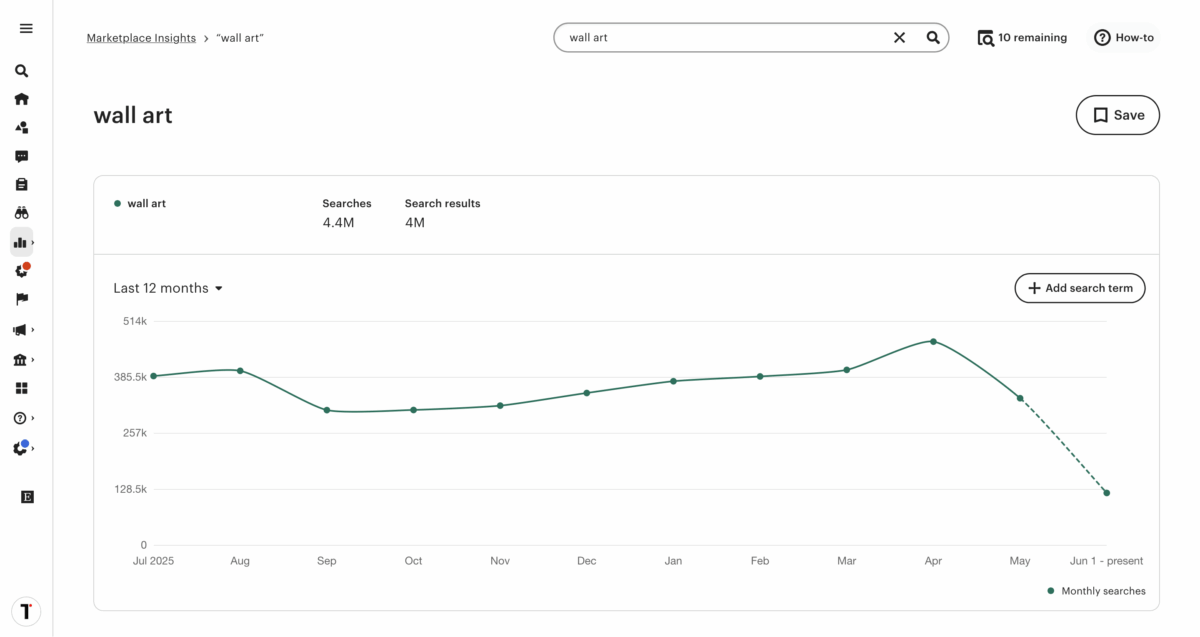
What I am saying is, say you are someone who could have spent a weekend building a wall art collection, and you are going to launch it tomorrow, you are walking into 3.8 million search results from competitors.
That is the number of active Etsy listings matched to the keyword “wall art” at this time.
So yes, you see the big picture now.
That’s not a product problem. That’s a research problem, and it happens before a single file gets made.
If you’re still figuring out what to sell, this list of digital product ideas is worth looking at before you commit to anything. But still, you really need to do your own research too.
Because if you skip this part, nothing else matters.

Step 1: Research Demand Before You Make Anything
This is the step every other first-time digital product seller either skips or never thought about at all, and just moves on. It’s also the step that changes everything.
So let’s actually do it.
The goal is simple.
Before you spend time making something, make sure real people are already searching for it on Etsy, and that the competition isn’t so heavy that a new shop with zero reviews has no real chance of being seen.
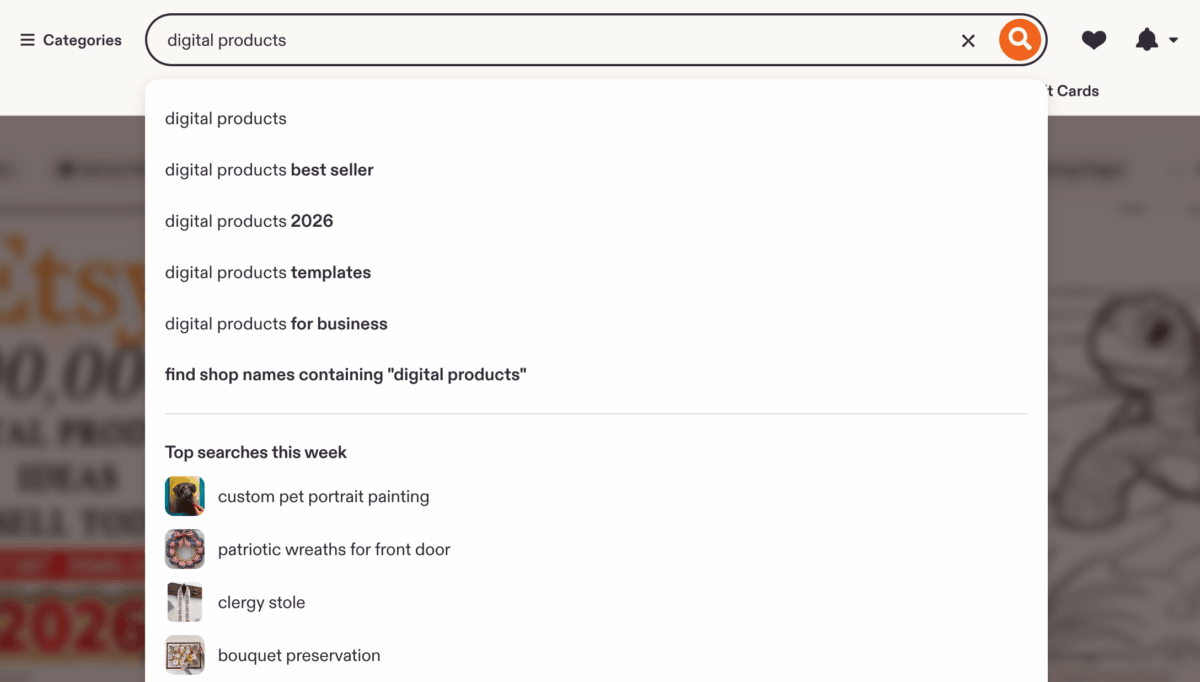
Use Etsy’s Own Search Bar First
This is the easiest and most practical way.
Open Etsy and start typing your product idea. Don’t press enter yet. Instead, just pause for a moment and pay attention to what the autocomplete feature suggests underneath.
Those search data can be used as your foundation. They are a useful starting point, broad but still a signal.
They tell you the category exists, but we need more signals. They still do not clearly show where the gap is.
Let’s say you type “digital planners”.
The autocomplete shows you “digital planners printable” and “digital planners download”.
But if you put like “digital planner for” into the search bar, you will also see things like “digital planners for kids,” “digital planners for men,” “digital planners for goodnotes.”
Yes, when we go that way, each one is a more specific keyword, and that gives us a really good spot to start from.
Go Deeper With Marketplace Insights
And next, take any of those keywords, for example, we take “digital planners for kids,” and go to your Etsy Shop Manager > Stats > Marketplace Insights and enter the keyword into the search bar to view search data.
But here, I should say you need an Etsy seller account to get into Marketplace Insights. If you don’t have one yet, this guide shows you how to set one up before you move on.
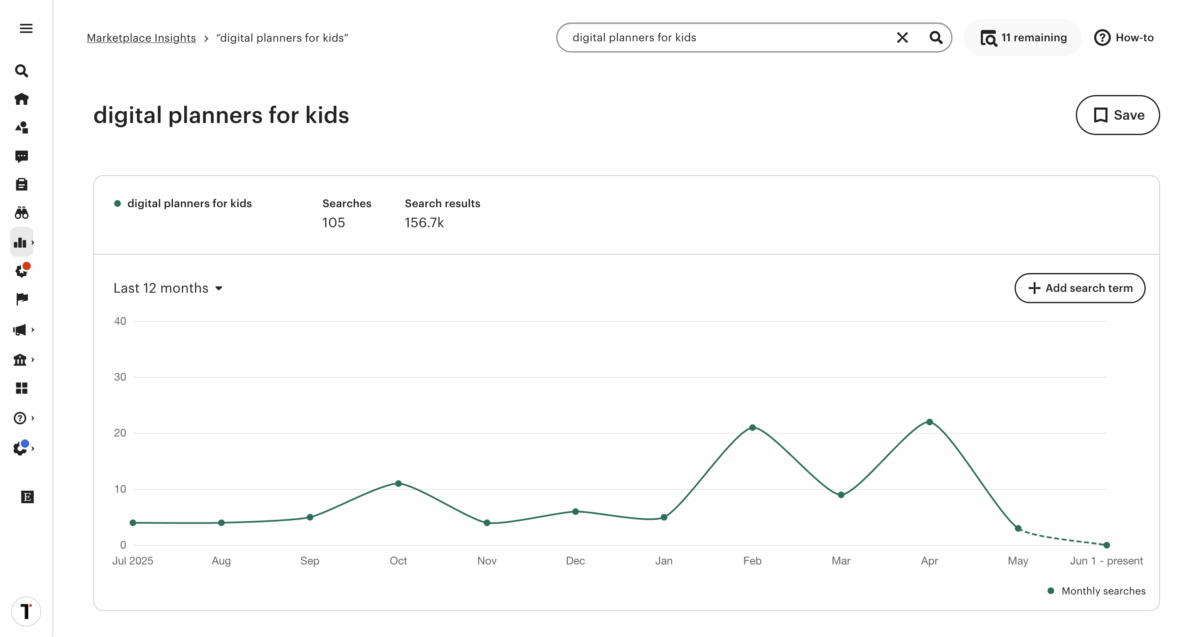
You will see how many searches, search results, and also what buyers are searching for on Etsy, more like what is under the keyword we entered. And those are the more specific searches buyers are making that you wouldn’t find just by guessing.

You can even go through each keyword one by one and see how each of them performs, and that hints at what size of audience you are going to reach, and also the competition it has.
And if we look closely, the search results column in Marketplace Insights is your competition number. The lower it is, the fewer listings you are up against.
When I searched “digital planners for kids,” Marketplace Insights showed only 105 searches over the last 12 months and 156.7k search results.
That is a lot of sellers chasing very little demand.
A bad combination.
But the similar terms table underneath showed “kids chore chart” with 1.7k searches and only 34.5k results. That is a completely different picture.
So the autocomplete gave me the starting idea. Marketplace Insights told me the idea itself was weak, but then showed me a better keyword sitting right next to it.
That is exactly what this tool is for.
And someone typing “kids chore chart” knows exactly what they want. If your listing matches that phrase, you are not competing with every planner on the platform.
You are competing with a much smaller pool. But try to compare keywords to see which have high demand but lower listing volume.
That’s the whole point of doing this first.
Step 2: Build a Listing Etsy’s Search Can Actually Find
According to Etsy’s own ranking disclosures, its search algorithm works in two stages, and most beginners only think about the second one.
The first stage is query matching.
Etsy checks whether your listing matches a search term using titles, tags, categories, and attributes. If the keyword is missing from your title and tags, you almost never have a chance to show up.
Makes sense right? How would they even know what this thing is for?
Other fields help, but titles and tags are what really matter. A keyword only in the description is not totally useless, but kind of almost there.
The second stage is ranking.
After you get past the first step, or we can say eligible, Etsy ranks listings using a listing quality score based on click-through rate, purchase rate, views, favorites, and past buyer behavior.
This is where a good product and good presentation (photos, price, description) start to matter.
But if you do not get past the first stage, the second step will never even start.
The Title
For years, the advice was to put as many keywords as possible into your title.
Something like “Digital planner, GoodNotes planner, iPad planner, Notability planner, Dated digital planner, Digital calendar.” Six keyword phrases all lined up one after another.
Sellers did it that way because it actually worked for them.
But Etsy’s own guidance now says that kind of title makes it harder for buyers to shop confidently.
Their new recommendation is to keep titles under 15 words, clearly state what the item is, and include the most important descriptors upfront.
Less keyword salad, more clarity.
So what does that actually look like?
Something like “Undated GoodNotes Digital Planner for iPad, Hyperlinked PDF.” That is clear, specific, front-loads the primary keyword, names the app, and tells the buyer exactly what format they are getting. And yes, under 15 words.
| Before | After |
|---|---|
| Digital planner, GoodNotes planner, iPad planner, Notability planner, Dated digital planner, Digital calendar | Undated GoodNotes Digital Planner for iPad, Hyperlinked PDF |
| Beautiful Cute Digital Planner for Women | Daily Digital Planner, GoodNotes PDF, Undated |
| Resume Template Professional CV Modern Design Best | ATS-Friendly Resume Template, Word and Google Docs, Single Page |
| Budget Planner Printable Finance Tracker Money Saving Budget Sheet Monthly Weekly | Monthly Budget Spreadsheet, Google Sheets Template, Editable |
| Canva Template Social Media Pack Instagram Posts Stories Reels Bundle | Instagram Canva Template Bundle for Coaches, 30 Posts and Stories |
The first word still matters; there is no second thought about that. Your primary keyword should still be at the front. That part has not changed.
What changed is everything after it.
And the bad example is still bad. “Beautiful Cute Digital Planner” opens with two adjectives nobody searches for. Etsy specifically says to move subjective words like “beautiful” or “perfect” to the description instead.
They do not belong in the title.
So the short version is, lead with the keyword, name the specific app or format if it applies, keep it under 15 words, and skip the extra stuff.
Tags
Etsy lets you put 13 tags, and each tag can have up to 20 characters. So put 13 tags. Every single one.
Every empty tag is a search match you’re leaving on the table. Use accurate and relevant phrases rather than single words because it simply increases your search visibility.
“Undated digital planner” is a stronger tag than “planner” by itself. Capitalization doesn’t matter. Etsy normalizes everything.
Description
What we know for sure is that your description changes how many people buy from you. And when someone buys, that sale makes your listing’s quality score go up.
Write yours to answer the buyer’s real questions: what’s in the file, how they’ll get it, what apps or software it works with, and any format details.
Put the primary keyword in the first sentence too. It helps with Google indexing even if Etsy doesn’t count it directly.
But to get the most out of SEO, you need content. So if you have a blog or website, linking back to your listings helps Google find them faster too.
This will not get you sales instantly or overnight. But if you are thinking long term, this is your best bet.
And if you want to do more than just pick keywords and actually write a description that gets people to buy, this guide shows you how, step by step.
Step 3: Your Listing Images Are Doing More Work Than You Think
Once a listing shows up in search, the biggest thing that makes someone click it is the first product photo, or what Etsy calls ‘Listing images’.
There is research around this, and what they did is, they looked at over 50,000 listings and used image quality features like blur, brightness, contrast, and texture to see if an image could predict if people would click, favorite, or buy an item.
Well, it worked. Their first photo is the most important thing for getting someone to click from the search page.
This makes perfect sense because online shopping is visual. You decide if you like the look of something almost instantly from the photo.
And Etsy tracks this.
We can look at this like this:
- Click Through Rate (CTR): Did they click? This is your thumbnail and title working.
- Conversion Rate: Did they buy? This is your description, photos, and price working.
So if your listing appears in results but people don’t click it, Etsy reads that as a signal the listing isn’t relevant or appealing, and it starts showing it less.
So the images you put aren’t just a design choice. They directly affect whether your listing keeps getting shown at all.
When it comes to selling digital products on Etsy, a flat PDF screenshot tells a buyer almost nothing. They can’t tell what’s inside, how it actually looks on a real device, or why it’s worth the money.
But a device mockup, the kind that shows the planner open on an iPad screen, with a text overlay naming one specific benefit, that’s a completely different message.
And this matters more for digital products than for physical ones, because buyers can’t touch it, can’t return it, and don’t see the full product until after they’ve paid.
The mockup is the only product demo they get. If it looks like a draft, the listing looks like a draft.
A quick Google search for “device mockups” gives you tons of free and paid options to pick from.
But the one I like most is Placeit by Envato.
They have the best mockup I have ever seen. And the backgrounds and the vibes you get with those look more natural than what you get anywhere else.
You don’t need to know design either.
Just drop the file into a device mockup, add one line of text that names the most useful thing about the product, and you’re already ahead of most beginner listings in the same category.
Step 4: How to Get Traffic When You Have Zero Audience
This is the part where most beginner guides give you a line like stay consistent on social media. And then they leave it right there with nothing else to go on.
I don’t think it’s that helpful if you have zero followers and no content history. So here’s what is actually realistic.
Etsy search is the first and most important source.
Not Pinterest, not Instagram, not Threads. Etsy’s own search. This is why the keyword research and listing setup in the earlier steps matter so much.
Etsy gives new listings a temporary boost, or we can say a visibility window, while it collects click data. Yes, you read it right.
During that window, your listing gets shown to real buyers. If the title, images, and price are all doing their job, that window turns into early sales, which build a quality score, which keeps the listing ranking.
The whole machine starts here.
Pinterest is the second realistic option, and it still works in 2026.
Pinterest is a search engine, not a social feed. Every pin is a clickable link. Pins stay live for months or years, not 24 hours like a social post.
Products that do well there tend to be visual ones, like planners, templates, printables, and art. But the thing is that Pinterest usually takes a few weeks before it starts sending meaningful traffic.
So yes, it’s not a week-one strategy. But it’s worth starting early because the compounding works once it happens, and pins you make today can still be driving traffic a year from now.
Yes, I am telling you from my experience.
For Etsy’s paid ads, one rule: only turn them on for a listing that has already made at least one organic sale. Ads push your listing in front of more people.
But still, they do not fix a listing that is not converting in the first place. If you go and look around, you will see sellers on the EtsySellers subreddit have talked about this pattern directly.
Ads just amplify what is already working. That is their only job, really.
And one more thing to watch: Etsy’s offsite ads.
If your shop makes under $10,000 a year, you can opt out of them, and if your digital products are priced under around $10, you probably should.
Etsy charges a 15% fee on any order that comes through an offsite ad. On a $5 product, after Etsy’s regular transaction fee and that 15%, you’re left with very little.
If and when your shop crosses $10,000 in sales, the participation becomes mandatory anyway, but the fee drops to 12%.
Already Have a Product With No Sales? Start Here
If you already built something, listed it, and nothing’s happening, here’s how to figure out what’s actually wrong before changing anything randomly.
Open Etsy’s Shop Stats and look at impressions first.
If impressions are very low, or basically zero, the listing has a visibility problem.
Etsy isn’t matching it to any real searches, which means the title and tags aren’t hitting any keywords buyers actually use.
Go back to Step 1, find a keyword that fits the product with real demand and manageable competition, and rework the title and tags around it.
Give it two or three weeks after that.
If impressions are okay but clicks are low, the problem is the first image.
The listing is showing up, but the thumbnail isn’t making people want to click. Fix the mockup before anything else.
If clicks are okay but nobody’s buying, that’s a conversion problem, not a traffic problem anymore. Something inside the listing is breaking the trust.
Maybe the price is too high or too low compared to other similar stuff.
Could be that the description doesn’t say what file format you get. Could be no reviews, which makes any digital product feel risky.
Or it could be that the thumbnail looks like one kind of product and the listing describes something slightly different.
And one more check is to look at the search results count for that keyword phrase from the Marketplace Insight tool. If you’re targeting something with 80,000 results and you have no sales history yet, yes, it is tough.
But still, you can find a similar search term or a longer tail variation with less competition, retitle the listing, and give it time to collect data again.
Final Thoughts
You can get that whole research step done in about 20 minutes, and you don’t even have to leave Etsy to do it.
Check if the keyword has real demand, and check if the competition count is something a new shop can work with.
If yes, make the product. If not, try the next idea. That’s the sequence.
Most people don’t do it because it feels like it takes longer than just jumping in and starting.
But that 20 minutes is usually what separates a listing that gets its first sale in the first month from one that sits for six months while you try different prices and wonder what’s wrong.
Happy selling!
Frequently Asked Questions
- How long does it take to make your first sale on Etsy selling digital products?
- It depends, but most new shops that do the keyword research and set up the listing properly see their first sale within 30 to 90 days. Shops that skip that part wait a lot longer, or never get there at all. The research and listing setup are the two things that actually move the timeline.
- Do you need social media to sell digital products on Etsy?
- No. Etsy’s own search is where most beginner sales come from. Pinterest can help over time since it works like a search engine and pins stick around for months, but you don’t need Instagram or TikTok to get started. Social media is not the first thing to worry about.
- What are the best digital products to sell on Etsy for beginners?
- Anything with real search demand and manageable competition. Right now, budget spreadsheets, Google Sheets templates, and niche Canva templates are in a better spot than broad categories like wall art or generic planners. But the category matters less than the keyword research. Always check the demand before you build anything.
- How many listings do you need to start making sales on Etsy?
- There’s no magic number. One well-researched listing can make sales. Ten listings with weak titles and no keyword research won’t. Get one listing right first before adding more. Quantity doesn’t fix a research problem.
- Can you sell the same digital product on multiple platforms?
- Yes. Etsy doesn’t stop you from selling the same file on Gumroad, Payhip, or your own site at the same time. A lot of sellers use Etsy for the built-in traffic and sell directly elsewhere to keep more of the margin. Etsy takes a cut on every sale, so having another channel makes sense once you have some traction.